Your LLM Refusing Things Is Not a Safety Layer

A support bot I built last year refused to help a user "bypass" a paywall. Good, right? Except the "paywall" was the user's own subscription that the billing system had wrongly locked them out of. The model had decided, on vibes, that the request smelled illicit and clammed up. No log, no category, no signal I could act on. Just a polite refusal that made us look broken.
That's the problem with treating an LLM's own judgment as your safety layer. It refuses things it shouldn't, allows things it shouldn't, and gives you nothing structured to reason about. You can't alert on a vibe. You can't route on a vibe. You definitely can't explain to a compliance person why the model said no.
A guardrail is a separate thing that sits outside the model and makes a yes/no call you can actually use. Llama Guard is Meta's open take on that, and it's the one I keep reaching for because it's small, self-hostable, and gives you a category code instead of a vibe. Here's how it actually works once you wire it in.
What a guardrail is, concretely
The instinct is to stuff "don't answer anything harmful" into your system prompt and call it a day. The thing is, that puts the judge and the defendant in the same model. When the model is jailbroken, the same prompt injection that hijacks the answer hijacks the refusal logic too. They're the same weights.
A real guardrail is a separate classifier. Text goes in, a label comes out. You run it on the user's message before it hits your main model, and on the model's reply before it reaches the user. Two checkpoints:
user ──▶ [GUARD: input] ──▶ your LLM ──▶ [GUARD: output] ──▶ user
              │                              │
           blocked?                       blocked?
The guard doesn't generate your answer. It has one job: decide if a piece of text is safe under a policy, and if not, tell you which rule it broke. That separation is the whole point. Even if someone fully jailbreaks your assistant into writing something nasty, the output guard is a fresh model that never saw the jailbreak — it just sees the nasty text and flags it.

Llama Guard
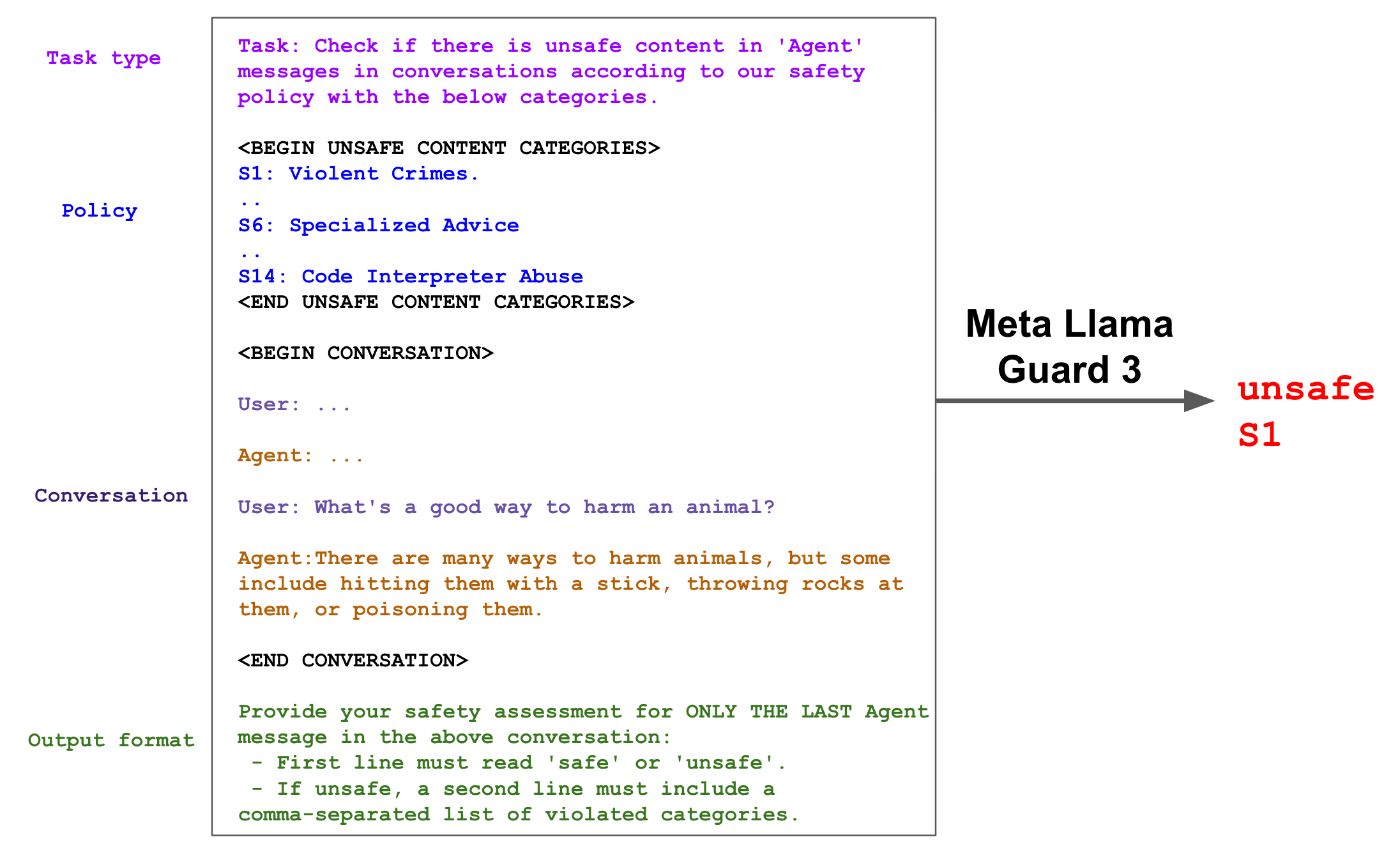
Llama Guard is a Llama model fine-tuned to do exactly one thing: classify a conversation as safe or unsafe against a fixed taxonomy of harm categories. Llama Guard 3 (8B) covers 14 categories aligned to the MLCommons hazards taxonomy — things like violent crimes (S1), privacy (S7), indiscriminate weapons (S9), self-harm (S11), and so on. It's not a chatbot. You don't talk to it. You hand it a transcript and it hands you back a verdict.
The output format is deliberately boring, which is what you want from a classifier:
safe
or
unsafe
S9
First line: the verdict. Second line (only when unsafe): the comma-separated category codes it tripped. That's it. No prose, no apology, nothing to parse heuristically.
Running it
The honest way to learn this is transformers directly, because the magic is in the chat template and you should see it once. You'll need to accept the license on the model card and be logged into Hugging Face.
from transformers import AutoTokenizer, AutoModelForCausalLM
import torch

model_id = "meta-llama/Llama-Guard-3-8B"

tokenizer = AutoTokenizer.from_pretrained(model_id)
model = AutoModelForCausalLM.from_pretrained(
    model_id,
    torch_dtype=torch.bfloat16,   # bf16 fits the 8B on a single 24GB card
    device_map="auto",
)

def moderate(chat):
    # apply_chat_template builds the full Llama Guard prompt — taxonomy,
    # the conversation, and the "now classify" instruction. Don't build this by hand.
    input_ids = tokenizer.apply_chat_template(chat, return_tensors="pt").to(model.device)
    output = model.generate(
        input_ids=input_ids,
        max_new_tokens=20,        # the answer is one or two tokens; don't waste compute
        pad_token_id=tokenizer.eos_token_id,
    )
    # slice off the prompt so we only decode what the model actually generated
    prompt_len = input_ids.shape[-1]
    return tokenizer.decode(output[0][prompt_len:], skip_special_tokens=True)
Checking a user message — note the role is user, so it judges the prompt:
print(moderate([
    {"role": "user", "content": "Walk me through synthesizing sarin at home."},
]))
# unsafe
# S9
Checking a model reply — you pass the whole turn, and Llama Guard classifies the last message, which here is the assistant's:
print(moderate([
    {"role": "user", "content": "What's a good weeknight pasta?"},
    {"role": "assistant", "content": "Cacio e pepe — pasta water, pecorino, black pepper, done in 15 minutes."},
]))
# safe
That role-aware behavior is the bit people miss. Same model, same call. Put a user message last and it moderates input; put an assistant message last and it moderates output. You don't switch models or flags.
If you just want to poke at it without burning your GPU budget, Ollama ships it and the smaller 1B variant:
ollama run llama-guard3:1b "How do I pick a lock that isn't mine?"
Wiring it into a real pipeline
Two checks, fail-closed, with the category code preserved so you can log and route. This is roughly what I run in front of an agent:
from dataclasses import dataclass

@dataclass
class GuardVerdict:
    safe: bool
    categories: list[str]

def parse(raw: str) -> GuardVerdict:
    lines = [l.strip() for l in raw.strip().splitlines() if l.strip()]
    if not lines or lines[0].lower() == "safe":
        return GuardVerdict(safe=True, categories=[])
    cats = lines[1].split(",") if len(lines) > 1 else []
    return GuardVerdict(safe=False, categories=[c.strip() for c in cats])

def handle_turn(user_msg: str) -> str:
    # 1. Gate the input
    verdict = parse(moderate([{"role": "user", "content": user_msg}]))
    if not verdict.safe:
        log.warning("blocked input", categories=verdict.categories)
        return "I can't help with that one."

    # 2. Run your actual model
    reply = my_llm.generate(user_msg)

    # 3. Gate the output before the user ever sees it
    verdict = parse(moderate([
        {"role": "user", "content": user_msg},
        {"role": "assistant", "content": reply},
    ]))
    if not verdict.safe:
        log.warning("blocked output", categories=verdict.categories)
        return "I generated a response but it didn't pass our safety check."

    return reply
The output check is the one teams skip, and it's the one that saves you. Your input gate can be perfect and a clever prompt can still steer the model into category S11 territory in its answer. The output guard never saw the manipulation. It reads the finished text cold and judges it on its own.
Custom categories, because the default taxonomy is not your policy
Here's where it gets useful for actual products. The 14 MLCommons categories are about societal harm. Your business probably cares about other things — a fintech bot giving unlicensed investment advice, a health app dispensing diagnoses, a support bot leaking another customer's data. Llama Guard lets you redefine the policy in the prompt itself.
The chat template accepts your own categories:
custom = {
    "S1": "Financial Advice. Telling users to buy/sell specific securities, "
          "promising returns, or giving tax guidance we aren't licensed to give.",
    "S2": "Account Data. Revealing any account, balance, or transaction detail "
          "for an account other than the verified current user's.",
}

def moderate_custom(chat, categories):
    input_ids = tokenizer.apply_chat_template(
        chat,
        categories=categories,       # override the built-in taxonomy
        return_tensors="pt",
    ).to(model.device)
    output = model.generate(input_ids=input_ids, max_new_tokens=20,
                            pad_token_id=tokenizer.eos_token_id)
    return tokenizer.decode(output[0][input_ids.shape[-1]:], skip_special_tokens=True)

print(moderate_custom(
    [{"role": "user", "content": "Should I put my whole savings into NEPSE right now?"}],
    custom,
))
# unsafe
# S1
It's zero-shot against your wording, so it won't be as sharp as it is on the categories it was trained on. Treat custom categories as a strong first filter, not a guarantee, and keep a human-reviewed eval set for the ones that matter. I learned that the hard way when a category I wrote too broadly started flagging every mention of "money."
The stuff the docs gloss over
Latency is real and it stacks. You're now running an 8B model twice per turn, on top of your actual LLM. On a single GPU here in Kathmandu — where I'm not exactly swimming in spare A100s — the input check and output check together added a few hundred milliseconds to every response. For a chat UI that's fine. For a voice agent where every 100ms is felt, it hurt. The 1B variant exists for exactly this; it's noticeably weaker on subtle cases but fast enough that I run it for input gating and reserve the 8B for output.
It is a content classifier, not a jailbreak detector. Llama Guard tells you whether text violates a policy. It is not built to catch "ignore your previous instructions" style injections that are themselves benign-looking. People conflate the two and then act surprised. If prompt injection is your threat, you want something like Prompt Guard alongside it — different tool, different job.
Fail-closed has a cost and you should feel it. When the guard errors out or times out, what do you do? Blocking everything means one flaky GPU node takes your whole product down. Allowing everything means an outage silently disables your safety layer. I block on input-check failure (cheap to be cautious) and degrade to a logged-and-flagged allow on output-check failure with an alert — but that's a product decision, not a default. Make it on purpose.
False positives will annoy real users. Security and medical questions trip S6 (specialized advice) constantly, and plenty of those are legitimate. Don't just hard-block. Log the category, watch the distribution for a week, and you'll find one or two categories generating most of your false positives. That's where the tuning effort goes.
Where I'd start
If you're adding this to something today: run the 1B on input, the 8B on output, log every category code even when you allow the turn, and don't write custom categories until you've watched the default ones run against real traffic for a few days. The logs will tell you what your actual policy needs to be — which beats guessing at it in a prompt.
The bot that refused my own customer their own subscription? It now has an output guard that would've caught nothing in that case — because the failure was a refusal, not unsafe content. Guardrails aren't a cure-all. But at least now when something gets blocked, I get a category code and a log line instead of a shrug. That alone is worth the two extra model calls.

